
List of available KACs:
Retrieving health data from IT assets is called Signal Collection in Kashef terminology. The mechanism for collecting this data is agent-less for the most part which means that agents do not have to be deployed on the target monitored server.
The following table provides a list of KACs (Kashef building block components) that support the signal collection process:
| KAC | Status | Function |
|---|---|---|
| Performance Counter Reader | Available | Converts information from local or remote Windows Performance Counter into signals. All Microsoft applications in addition to majority of commercial Windows based applications publish critical health data using performance counters. This means that Kashef users can tap into a wealth of application vitals simply with this KAC. For example See http://technet.microsoft.com/en-us/library/cc728167(WS.10).aspx for inventory of possible Windows 2003 performance counters. |
| Http Reader | Available | Used for "URL Ping" type monitoring to examine the availability and performance of web site health check pages. In a similar manner to hardware load balancers, this KAC allows a regular heart-beating check to be performed against a health check URL. Any URL available on the target application can be used. For simple applications, typically the default or login page is usually used. Health-check URLs available with advanced application provide a comprehensive means of detecting health as well. |
| File Reader | Available | Used to monitor log entries in any structured text file. Whether on the local server or through a UNC path, the File Reader can continuously log files and digesting any new content. Matched content is converted to Kashef signals for downstream analysis. Matching is based on the very flexible regular expression syntax. Example of files that can be monitored in this manner are IIS or apache Log files. |
| WMI Query Reader | Available | Provides the ability to execute a Windows Management Instrumentation (WMI) query and converts the results into Kashef signals. WMI queries can retrieve a wealth of information from Windows based systems. One example of a critical sub-system that can be queried using WMI is the Windows Event Log. |
| COM Plus Reader | Available | Many industry applications still depend on COM+ technology for hosting critical business logic. This KAC can enumerator local COM+ objects and provide real-time throughput and latency statistics. |
| LDAP Reader | Planned | Used to convert LDAP queries into Kashef signals in a similar manner to the WMI Query Reader. |
| SQL Reader | Available | Provides SQL source health checks and actual SQL data access. Able to retrieve data from any source with provider including OLEDB, ODBC, SQL, Oracle, DB2 and mySQL. |
| PowerShell Reader | Planned | Used to execute Powershell CMDLets and transform data into Kashef signals. |
| JMX Reader | Planned | Used to integrate with JMX capable J2EE containers to extract Java application availability and performance data. |
| Transformer | Available | A general purpose KAC capable of executing C# code at runtime This provides a powerful component for extracting information using any of the available .Net framework libraries. An example use of such scripts is for simulating end user transactions to a web application. |
Once a health data is converted to signals using any of the available collection KACs, they are available for use by analysis KACs. Analysis may involve such operations as filtering, aggregation, transformation, statistics analysis and conditional routing.
The following table provides an overview of related Kashef KACs:
| KAC | Status | Function |
|---|---|---|
| Multiplexer | Available | Adds one or more signals to an existing carrier signal or as part of a new carrier signal. Carrier signals group multiple signals together so that they are transported together across analysis KACs or across KPACs. |
| DeMultiplexer | Available | Splits an incoming carrier signal into the signals which it's carrying. |
| Replicator | Available | Clones a given signal into one or more copies for propagation into parallel processing pathways. |
| Switch | Available | Routes a given signal into a positive or negative path depending on a conditional user defined expression |
| Filter | Available | Applies a signal filter against all the sub-signals of an input carrier signal. The result is a new carrier signal carrying only the sub-signals matching the user defined expression. |
| Statistics Analyzer | Available | Applies a running statistical analysis against an input signal or group of signals. A user defined time window determines the running sliding statistical intervals. Statistics include minimum, maximum, average, standard deviation and rate. |
| OLAP Analyzer | Planned | Provides streaming multi-dimensional analysis capabilities against input signal data. |
| Group | Available | Performs a specific grouping operation against an input signal hierarchy. |
| Finite State Machine | Available | Enables analysis scenarios that need to track changes to a given item's state and cause different actions depending on the state changes. For example, an email notification needs to be sent when a service is down and then again when it goes back up. |
| Transformer | Available | In a analysis context, allows for the creation of a new signal with values based on information from one or more input signals. Transformation rules follow user defined mappings rules represented as C# language expressions. Language Integration Query, which is a feature of C# language, is best used in this context for performing advanced signal processing rules. |
Kashef signals whether raw collected signals or processed and transformed signals can be published for use by other systems. This provides a powerful integration facility for systems such as System Center Operations Manager (SCOM) to capture Kashef provided data for specialized reporting and historical storage.
Amongst the KACs supporting this function are:
| KAC | Status | Function |
|---|---|---|
| Performance Counter Generator | Available | Publishes an incoming a signal into a windows performance counter. |
| File Logger | Available | Logs incoming signal data to a compact binary log file which can then be post-processed for crude historical trend analysis. |
| SNMP Generator | Planned | Converts signals to SNMP health data. |
Visualization KACs convert data into graphical gauges which act as the building block of a monitoring dashboard.
The following gauges are available:
| KAC | Status | Function |
|---|---|---|
| Label | Available | Used to display static text on a dashboard. |
| Picture | Planned | Used to display static background picture on a dashboard. |
| Health | Available | Provides a visual representation of a signal value along with color switching ability. Example usage would be to show green for healthy component and red for critical conditions. Can also be used to provide drill-down link capability to display other sub-dashboards. |
| Table | Available | Provides a tabular representation of group of input signals including all the signal metadata and data. Other features include color highlighting depending on input values along with conditional linking ability to other dashboards. |
| Chart | Available | Translates input signal data to a real-time health chart. Chart formats supported include Trend, Stacked, Column and Pie. |
Notification to unattended operators can be accomplished through three KACs:
| KAC | Status | Function |
|---|---|---|
| Mail Sender | Available | Sends an email through an SMTP gateway. Triggering condition and email content is based on input signals. |
| SMS Sender | Planned | Sends an sms through an SMSC gateway. Triggering condition and email content is based on input signals. |
| Transformer | Available | Through its ability to host any user defined C# script, any custom notification logic can be implemented with a Transformer. |
Standard Kashef based implementations requires the collaboration of multiple KPacks hosted on different servers. This makes possible a highly scaleable monitoring infrastructure that can span continents in some instances. To make this possible, Kashef provides a variety of KACs to facility inter KPack communication.
These include the following:
| KAC | Status | Function |
|---|---|---|
| Pipe Sender and Receiver | Available | Allows signals from a sender to be pushed to a receiver on the same machine or another using the Named Pipe Protocol. |
| HTTP Sender and Receiver | Available | Allows signals from a sender to be pushed to a receiver on the same machine or another using the HTTP Protocol. This communication path can travel through firewalls and http proxies. |
| TCP Sender and Receiver | Available | Allows signals from a sender to be pushed to a receiver on the same machine or another using the TCP Protocol. This is the most efficient protocol and is used for high the most demanding distributions. |
| TCP Distributor and Collector | Available | Similar to TCP Sender/Receiver but allows for connections to be established from a tcp client (Collector) to a single distributor who is listening for incoming connections and pushing signals to all connected clients. This mode of communication is ideal for communication with visualization workstations which can be added dynamically without any server reconfiguration. |
A Kashef Component Pack is a collection of KACs grouped together to provide a common function. Examples include a SQL Server Collection and KPack, SQL Sever analysis KPack, and an IIS analysis KPack. KPacks are self contained and include all the resources and configuration needed to execute.
Making advanced and complex KPacks possible is the "Integrated Circuit" KAC which acts as a container for other KACs including Integrated Circuits.
Integrated Circuit KACs is a very flexible container which allows templating functionality and can be used to clone an existing module dynamically and increase KPack reusability.
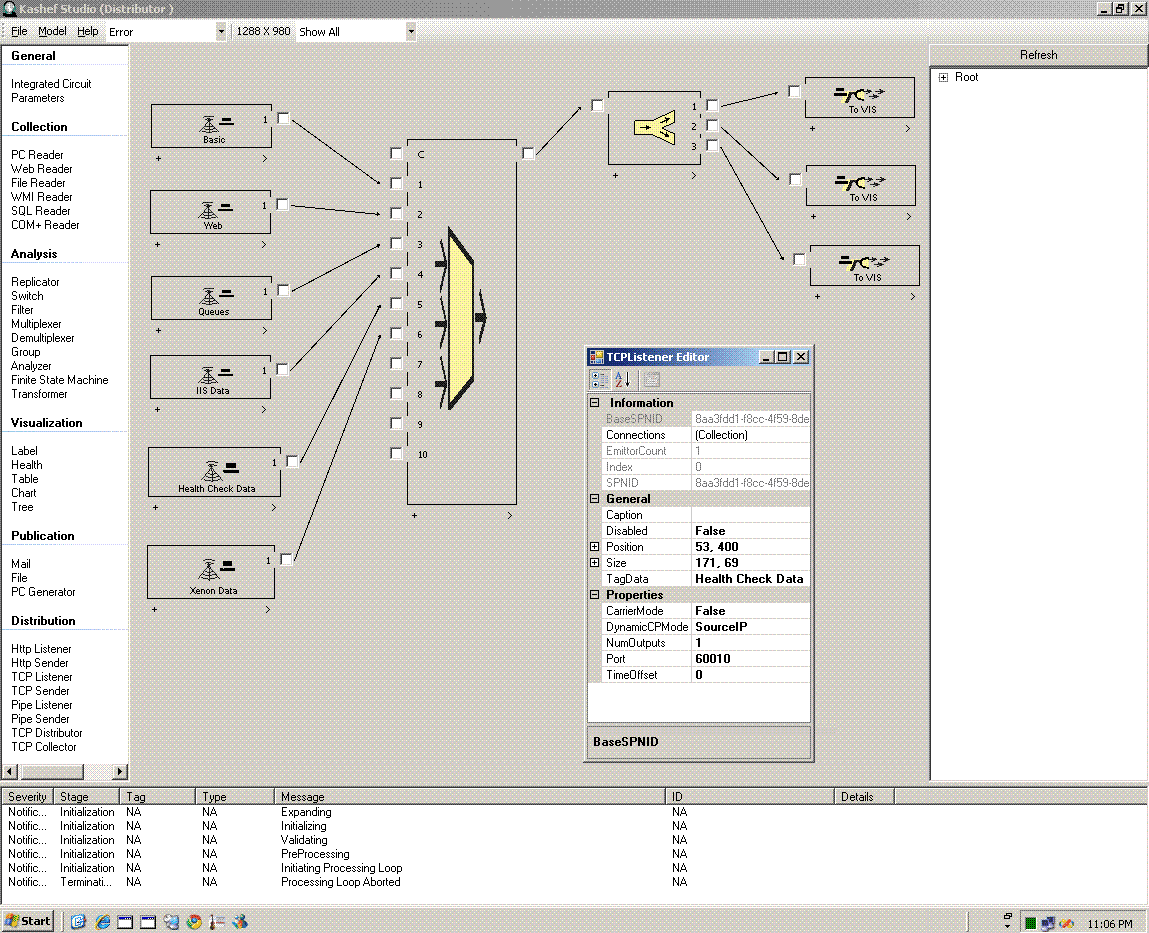
Kashef Packs can be hosted inside a Windows Service or executed in the Kashef Studio. Typically the Studio is only used configuration, debugging and troubleshooting purposes. A windows service host ensures monitoring services are ran as a background process and automatically started if a Server is rebooted. The same tool is used for dashboard navigation.
An easy to use graphical environment provides one tool for defining, revising, testing and running Kashef Packs.
Features include:
- Fully graphically driven workbench for creation and configuration of KACs
- Validation and troubleshooting ability that can pinpoint errors in configuration or dynamic scripts
- Dynamic inspection of signal data as it flows across KACs
- Visualization of dashboards and related Gauges
Sample Screen Shot: